
 Add to Chrome
CODE LISTINGS
Abyss Codes
Browse the recorded codes for Abyss. Each entry shows its source and check date; use the steps below when you try one in the game.
Latest source check:
How to redeemActive codes
Available codes, rewards and source check dates.
| Code | Description | Status |
|---|---|---|
MONKE | + 200 Star Shards, +1 Strength Potion | Active |
Source checked: Source detailsSource type: Source listing Listed in the reviewed publisher’s current redeemable-code list.
1 recorded event in this entry’s check history. | ||
SPORE | +400 Star Shards | Active |
Source checked: Source detailsSource type: Source listing Listed in the reviewed publisher’s current redeemable-code list.
1 recorded event in this entry’s check history. | ||
LOVE | +10 Valentines Tickets, +1 Love Potion | Active |
Source checked: Source detailsSource type: Source listing Listed in the reviewed publisher’s current redeemable-code list.
1 recorded event in this entry’s check history. | ||
FISHPOND | +500 Star Shards, +2 Octopus Feed | Active |
Source checked: Source detailsSource type: Source listing Listed in the reviewed publisher’s current redeemable-code list.
1 recorded event in this entry’s check history. | ||
SORRYDELAY | +200 Star Shards | Active |
Source checked: Source detailsSource type: Source listing Listed in the reviewed publisher’s current redeemable-code list.
1 recorded event in this entry’s check history. | ||
BUGFIX01 | +100 Star Shards, +2 Drop Luck Potion, +1 Speed Potion | Active |
Source checked: Source detailsSource type: Source listing Listed in the reviewed publisher’s current redeemable-code list.
1 recorded event in this entry’s check history. | ||
RELEASE | +100 Star Shards, +5 Small Oxygen Pods, +1 Speed Potion | Active |
Source checked: Source detailsSource type: Source listing Listed in the reviewed publisher’s current redeemable-code list.
1 recorded event in this entry’s check history. | ||
How do I redeem codes in Abyss?
- Join Abyss on Roblox.
- Select the Settings gear icon.
- Scroll to the bottom of Settings to find the Codes section.
- Copy a code from the list above and paste it into the Enter code field.
- Select Redeem, then read the game's response.
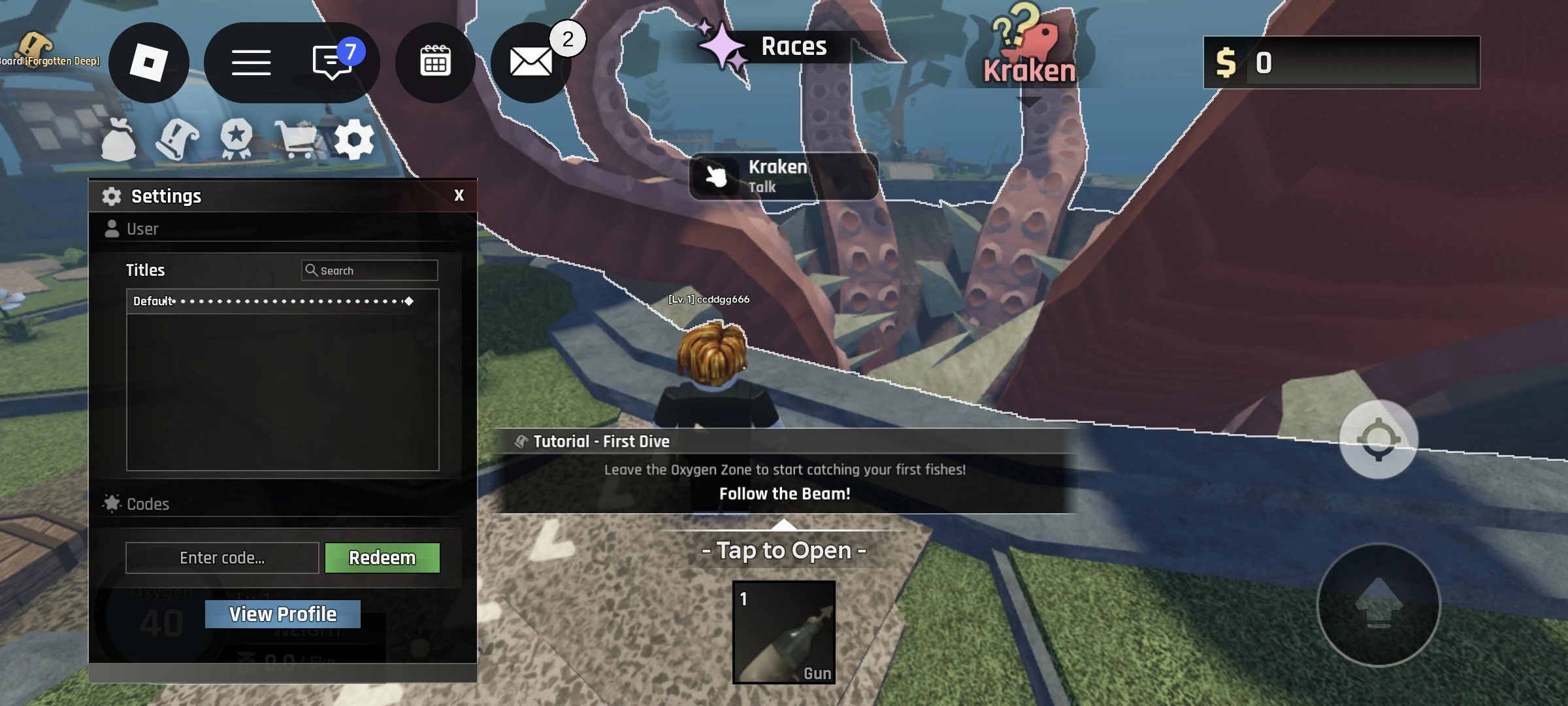
Open Settings and scroll to the bottom to find Codes. Enter your code and select Redeem.
View full-size screenshot (new tab)Why isn’t my code working?
- Copy the exact characters and punctuation shown in each entry.
- Check the date and source attached to each code.
Sources & check history
Sources are listed with their review dates.
- Abyss BloxInformer Codes ↗community
Exact code strings and displayed rewards reviewed from this game’s Codes page. Availability review: Code rewards and availability reviewed from the publisher’s code tables at the date shown. Active, Check and expired sections were distinguished.
Observed Oct 4, 2026 - Abyss in-game redemption screenshotcommunity
In-game screenshot supplied by the site owner and reviewed on October 2, 2026. The owner confirms that opening Settings and scrolling to the bottom reveals Codes. The screenshot shows the code input field and Redeem button.
Observed Oct 2, 2026